

Holiday under the Swedish Annual Leave Act, per employee and holiday year
Timply keeps each employee's holiday year, paid and unpaid days, days saved from earlier years and manual adjustments.
- Part of
Absence and leave
- Included in
Pro · Enterprise
- Available on
Browser · iPhone · Android
What you get
The holiday balance is a figure in the system, open to whoever needs to read it.
Saved days carry over into the next holiday year.
Holiday taken reaches payroll as SEM at the right extent.
Four numbers, kept apart
Holiday goes wrong when four different things get added into one. Timply keeps them separate per employee and per holiday year.
- Entitlement, the number of days the employee has a right to.
- Paid days, the ones earned during the qualifying year.
- Saved days, carried in from earlier years under sections 18 to 20 of the Annual Leave Act.
- Adjustment, the manual correction that makes the opening balance true.
Starting in the middle of a year
Nobody adopts a new system on the first day of a holiday year. The adjustment field exists so you can enter the balance each employee actually has when you start, including advance holiday, which is entered as a negative.
Without it the first holiday year in a new system is wrong for everybody, and the error follows the saved days forward.
The holiday year is yours
The Annual Leave Act does not fix a start date, and businesses use different ones. You enter the one you use and the qualifying year is calculated against it. A system that assumes 1 April is quietly wrong for everyone who starts the year somewhere else.
Days, not kronor
Timply counts days. Working out what a day is worth under the sammalöneregeln or the procentregeln needs salary figures that live in the payroll system, which is where that calculation belongs.
What Timply sends across is holiday taken, booked as SEM at the right extent, so the payroll system is calculating from a figure it did not have to be given by hand.
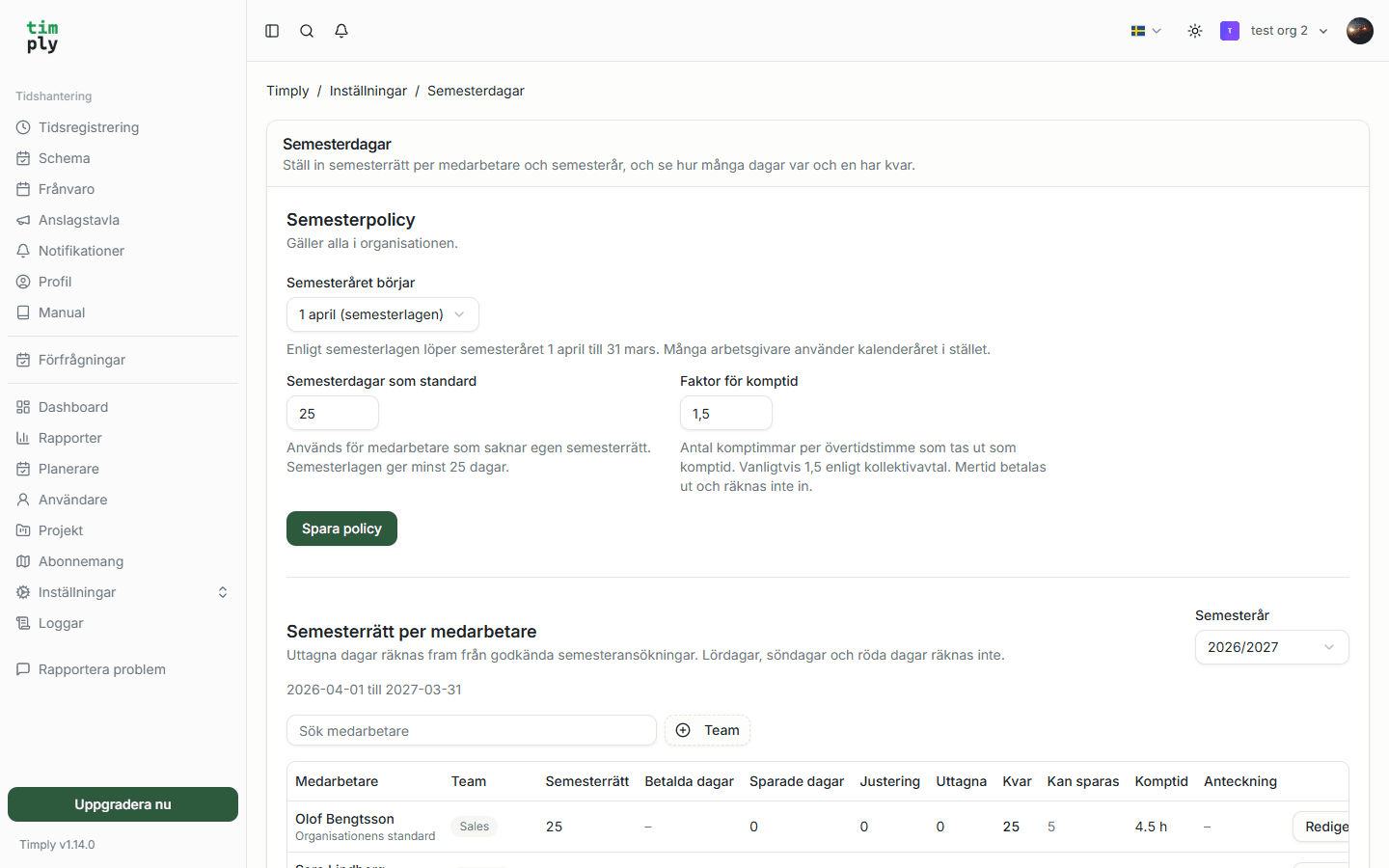
How it works in Timply
- Holiday year
The start date you actually use, April or January
- Entitlement
Set per employee and holiday year
- Paid days
Calculated from the qualifying year, allowing for non-qualifying absence
- Saved days
Days carried in from earlier years under sections 18 to 20 of the Annual Leave Act
- Adjustment
A field for entering the balance an employee actually has when you start, including advance holiday as a negative
- Overview
Entitlement, paid, saved and taken per employee for the holiday year
- Payroll
Holiday taken is booked as SEM with the right extent
Common questions
Which plan includes the holiday calculation?
Pro. Leave requests including holiday requests are in Core, but the calculation of entitlement, paid days and saved days needs Pro.
Can we set our own holiday year?
Yes. You enter the start date your business uses, and the calculation follows it.
Is holiday earned automatically as somebody works?
Entitlement is set per employee and holiday year, and leave requests are marked as holiday-qualifying or not. Paid days are calculated from that for the holiday year.
What happens to saved days after five years?
The Annual Leave Act says saved days should be taken within five years of the end of the holiday year in which they were saved. Timply shows the saved balance per employee in the holiday overview, and the days are drawn down as they are taken.
Can we enter balances when we start mid-year?
Yes. The adjustment field takes the balance each employee actually has, including advance holiday entered as a negative.
Does Timply calculate holiday pay in kronor?
Timply counts days. The calculation in kronor under the sammalöneregeln or the procentregeln needs salary figures and is done in the payroll system.
More features
Leave requests and absence, with a decision that is recorded
Staff request leave and report sickness in the app. A manager approves, and the absence goes to payroll with its own code and the extent that was approved.
A payroll file your payroll system imports without rework
Worked hours, OB, overtime, mertid and absence are totalled per employee and given the right payroll code. You download a PAXml 2.0 file and import it.
Reports with a column per figure, and an Excel export
One row per day and employee, with scheduled time, worked time, the difference, mertid, overtime, time off in lieu and a column per OB category.
Time reporting with scheduled and actual hours on the same row
One row per employee and day, with the hours scheduled, the hours worked and the difference between them. Deviations are visible the same day rather than at the end of the month.
This feature is part of Timply's system for scheduling, time tracking and payroll files. See all features
Try Timply with your own staff
Set it up yourself with your real schedule and your real staff. If you would prefer someone to walk you through it, book a demo.
- Trial
- 14 days
- Credit card
- Not required
- Refund
- Within 30 days of purchase