

Overtime or time off in lieu, chosen when the hours are recorded
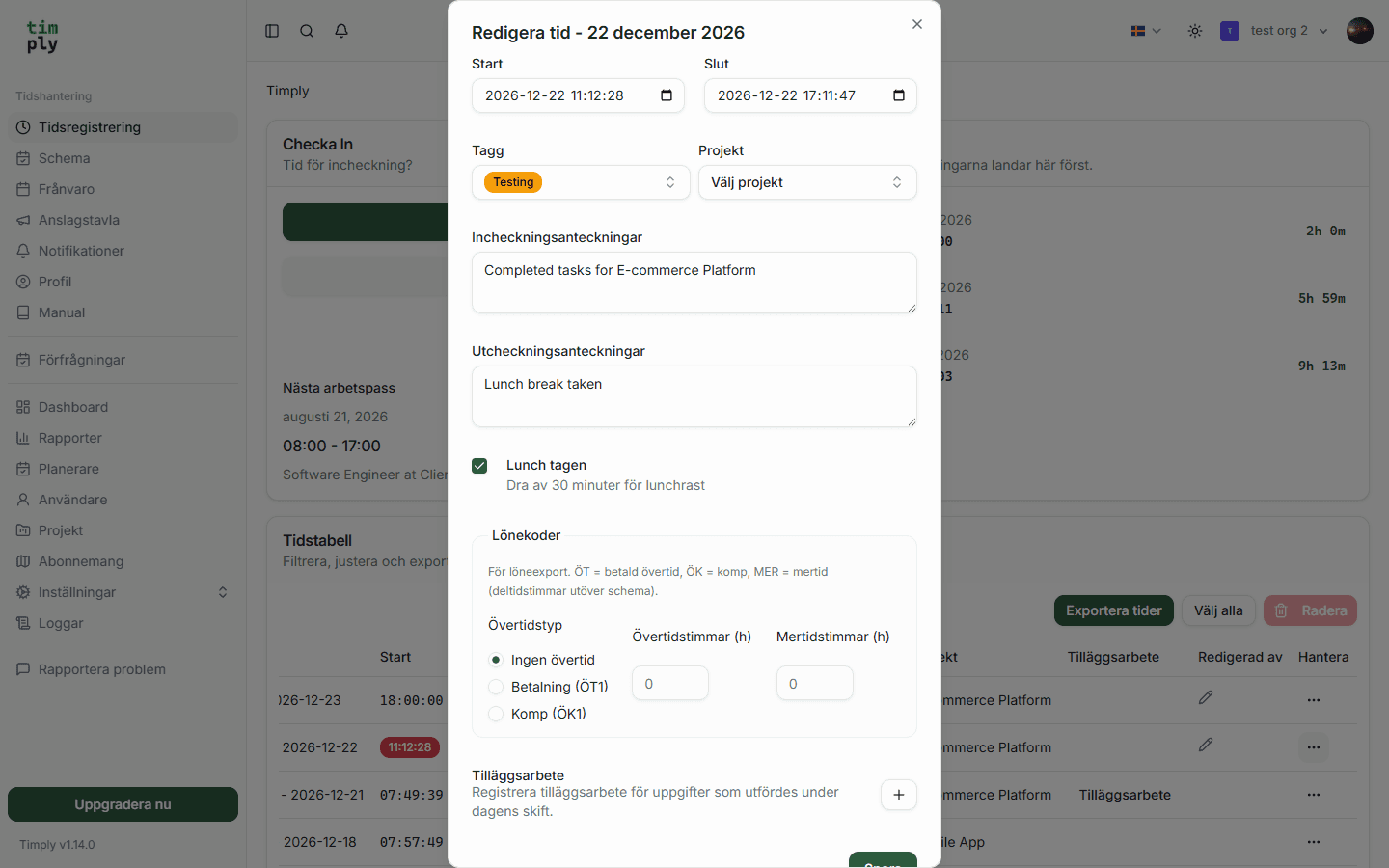
The employee picks payment or time off at the moment the overtime is recorded, and the choice carries through to the payroll file as ÖT1 or ÖK1.
- Part of
Time
- Included in
Core · Pro · Enterprise
- Available on
Browser · iPhone · Android
What you get
The choice between payment and time off is made once and recorded, not chased later.
Mertid is kept apart from overtime, so part-time staff get the right code.
The hours carry their payroll code from the time report onwards.
The choice is made once
The awkward part of overtime is rarely the arithmetic. It is that the decision about what to do with the hours gets made weeks later, by someone reconstructing what an employee probably wanted.
In Timply the employee chooses payment or time off in lieu at the moment the overtime is recorded, and sees which payroll code that produces before saving. The choice becomes ÖT1 or ÖK1 and travels with the hours all the way into the payroll file.
Mertid is its own thing
For a part-time employee, hours above the schedule but below the full-time measure count as mertid: above their contract, and still short of full time. Most Swedish collective agreements pay mertid differently from overtime, and mixing the two is the kind of error that stays invisible until somebody checks a payslip.
Timply draws the line using the contracted hours per week you set on each employee. Hours up to a full day are booked as MER and hours beyond it as ÖT1 or ÖK1.
Full time is 40 hours in Timply
Timply treats full time as 40 hours a week and a full day as eight hours. That figure cannot be changed today. What you do set per employee is their contracted hours per week, and that is what Timply compares against when a part-timer works more than their schedule.
If your collective agreement sets a lower full-time measure, such as the 38.25 hours Detaljhandelsavtalet gives much of retail, the line between mertid and overtime does not fall where Timply draws it. Check those hours against the agreement before payroll runs. A full-time measure you can set yourselves is planned.
The balance
Time off in lieu accrues as a figure per employee and is drawn down when it is taken. Taking it is recorded as absence with the code KOM, so the balance and the payroll file always agree.
How it works in Timply
- Detection
Time beyond the scheduled hours is worked out automatically, per day
- Choice on recording
The employee picks payment, time off in lieu, or no overtime at all
- Paid overtime
Booked as ÖT1
- Time off in lieu
Booked as ÖK1
- Mertid
Part-time hours beyond the schedule and up to a full day are booked as MER
- Manual hours
Overtime and mertid hours can also be entered by hand
- Columns
MER, ÖT and ÖK as their own columns in the time report and the Excel export
- Taking it
Time off in lieu taken is booked as absence with the code KOM
Common questions
What is the difference between overtime and mertid?
Mertid is the hours a part-timer works above their contract but below the full-time measure. Overtime is the hours beyond the full-time measure. Most Swedish collective agreements pay them differently, which is why they get separate codes, MER and ÖT1.
Who chooses between payment and time off in lieu?
The employee, at the moment the overtime is recorded. The choice becomes ÖT1 for payment or ÖK1 for time off, and it carries through to the payroll file without anybody asking again.
Does Timply track the annual overtime ceiling?
The reports show recorded overtime per employee for any period you choose, which is the basis the ceiling is followed up against. Timply does not raise a warning when the ceiling is approached.
Can a manager change the choice afterwards?
The entry can be corrected, and the correction keeps the original alongside it so the change stays visible.
How is time off in lieu taken?
As absence, booked with the code KOM, which draws it down from the balance.
More features
Time reporting with scheduled and actual hours on the same row
One row per employee and day, with the hours scheduled, the hours worked and the difference between them. Deviations are visible the same day rather than at the end of the month.
A payroll file your payroll system imports without rework
Worked hours, OB, overtime, mertid and absence are totalled per employee and given the right payroll code. You download a PAXml 2.0 file and import it.
OB, split by the hours and weekdays you set
You enter the windows your collective agreement uses. Timply divides every clocked hour between them and books each part to the payroll code it belongs to.
Leave requests and absence, with a decision that is recorded
Staff request leave and report sickness in the app. A manager approves, and the absence goes to payroll with its own code and the extent that was approved.
This feature is part of Timply's system for scheduling, time tracking and payroll files. See all features
Try Timply with your own staff
Set it up yourself with your real schedule and your real staff. If you would prefer someone to walk you through it, book a demo.
- Trial
- 14 days
- Credit card
- Not required
- Refund
- Within 30 days of purchase