

Lay out the week and publish it
Create shifts, staff them and see straight away which ones are unstaffed. Everyone gets their own schedule on their phone the second it is published.
- Part of
Scheduling
- Included in
Core · Pro · Enterprise
- Available on
Browser · iPhone · Android
What you get
Unstaffed shifts are visible while the week is being planned, not on the day.
Staff read their own shifts on their phone, wherever they are.
A published change reaches everyone at once.
The week on one screen
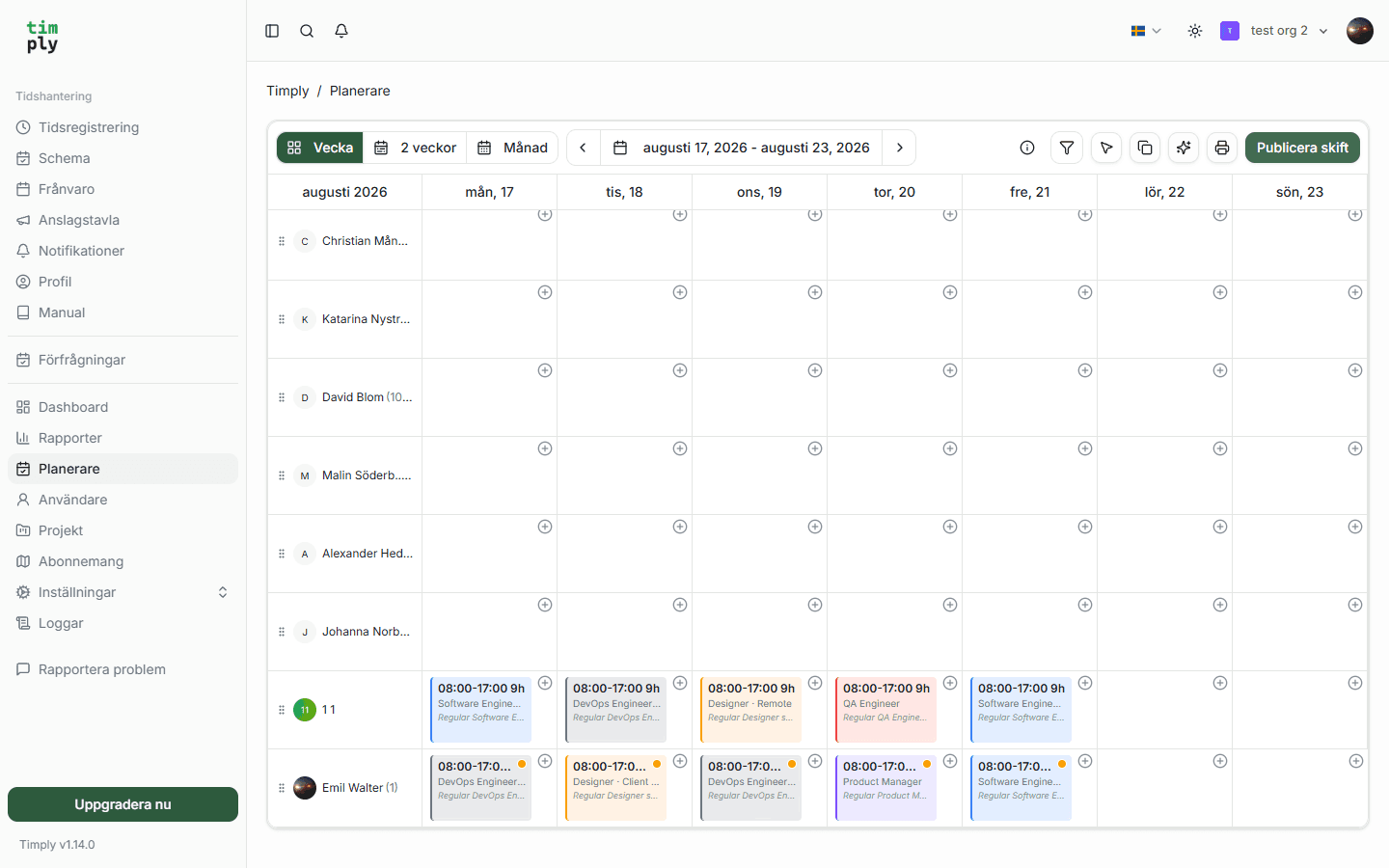
Scheduling is mostly a question of who is not there. Timply shows the week per employee and per day, and marks the shifts that still need somebody, so the gap is visible while you are still planning.
A shift carries its start, its end, its break and how many people it needs. When fewer people are assigned than the shift needs, it stays marked.
Publishing is a decision
A draft week is yours. Staff see nothing until you publish, at which point everybody assigned gets a notification and their own shifts appear in the app.
Shifts can also be subscribed to from Apple Calendar, Google Calendar or Outlook. That is worth setting up once, because it means a republished week updates itself in the calendar people already look at, without anybody being asked to check the app.
The schedule as a reference
Once a week is published it becomes the thing actual hours are compared against. The time report puts scheduled and worked hours on the same row with the difference between them, which is only possible because the schedule exists as data.
Copying a week forward
Most weeks resemble the last one. A week can be copied forward and then adjusted, which is the difference between scheduling taking ten minutes and taking an afternoon.
How it works in Timply
- View
A week per screen, per employee and per day
- Shifts
Start, end, break and how many people the shift needs
- Staffing
Unstaffed shifts are marked while the week is being planned
- Publishing
A published week is visible to staff immediately, with a notification
- Repeating
A week can be copied forward and adjusted
- Calendar
Shifts can be subscribed to from Apple Calendar, Google Calendar and Outlook
- Against actual
The published shift becomes the reference the time report compares against

The schedule and the leave requests are in Timply, and everybody sees their own week on their phone.
Common questions
Can staff see the schedule before it is published?
No. A week is visible to staff when you publish it, which means you can lay out a draft without anybody planning their life around it.
Do staff get told when the schedule changes?
Yes. Publishing sends a notification, and the shift updates by itself for anybody who has subscribed to it from their own calendar.
Can we copy a week forward?
Yes. You copy the week forward and adjust the shifts that changed, which is what most of scheduling actually is.
Does Timply warn if a schedule breaks the Working Hours Act?
No, there is no automatic warning. The schedule shows how the shifts fall per person and week and the time report shows what was actually worked, so the rest between two shifts can be read off the basis.
Can employees swap shifts between themselves?
Not today. Shifts are assigned by whoever plans the week, and a change is made there and republished.
More features
A digital time clock in the phone or on a shared terminal
Staff clock in and out in the app or the browser. The time is recorded against the server as it happens, so it is not written down and typed up later.
Time reporting with scheduled and actual hours on the same row
One row per employee and day, with the hours scheduled, the hours worked and the difference between them. Deviations are visible the same day rather than at the end of the month.
Leave requests and absence, with a decision that is recorded
Staff request leave and report sickness in the app. A manager approves, and the absence goes to payroll with its own code and the extent that was approved.
A payroll file your payroll system imports without rework
Worked hours, OB, overtime, mertid and absence are totalled per employee and given the right payroll code. You download a PAXml 2.0 file and import it.
This feature is part of Timply's system for scheduling, time tracking and payroll files. See all features
Try Timply with your own staff
Set it up yourself with your real schedule and your real staff. If you would prefer someone to walk you through it, book a demo.
- Trial
- 14 days
- Credit card
- Not required
- Refund
- Within 30 days of purchase